
Find out who really wants to buy
Targometr turns attendee activity at fairs into measurable purchase intent. Exhibitors get leads ordered from the most interested, the organizer sees real engagement, and the attendee has the booth's offer on their phone after one scan.
Runs in the phone browser — no app to install.
- Booth QR scan1×
- Product opened3×
- Product saved2×
- Contact requestyes
After a fair you are left with a box of business cards. And little else.
The exhibitor comes back with a list of names but does not know who was really interested, or in what. The organizer knows how many tickets were issued but cannot show exhibitors what they got for the booth fee. The attendee comes back with a bag of catalogues they will never open.
Does not know who to call first
A hundred business cards look the same. Sales teams spend the first week after the fair calling people who were only passing by.
Has no proof of value
“It was busy” does not convince an exhibitor to book a booth for the next edition. Visit and lead numbers do.
Loses track of what caught their eye
Photos of labels on the phone and leaflets in the bag. A week later it is hard to tell which product came from whom and on what terms.
For trade fairs and consumer fairs
The same QR code on the booth, two ways of working — depending on who comes to your fair.
Visitors are companies, the sales contact matters
Registration with a QR ticket, check-in at the door and leads with a purchase intent score. The exhibitor knows who to call first, and the organizer has numbers for selling the next edition.
Visitors are private individuals, the on-site purchase matters
No registration and no tickets: a visitor scans the code, sees fair prices and gets a coupon. The exhibitor counts used coupons and subscriptions to their offers, the organizer sees the traffic at every booth.
One fair, three sides, a shared result
You know what really happens at your event
Attendance hour by hour, the most visited booths, the most popular products and the number of leads for each exhibitor. Numbers you can show when selling the next edition.
You come back with leads, not a stack of business cards
You get contacts from people who asked for it themselves, ordered by purchase intent score, with the list of products they chose.
One scan and the booth's offer is on your phone
Exhibitor contact details, fair promotions and products with no app to install. Everything they save stays in “My fair”.
How Targometr works
Five steps from entering the fair to a sales conversation.
- 1
Registration and entry
The attendee registers on the event page, gets a QR ticket and enters after a quick scan at the door.
- 2
One scan at the booth
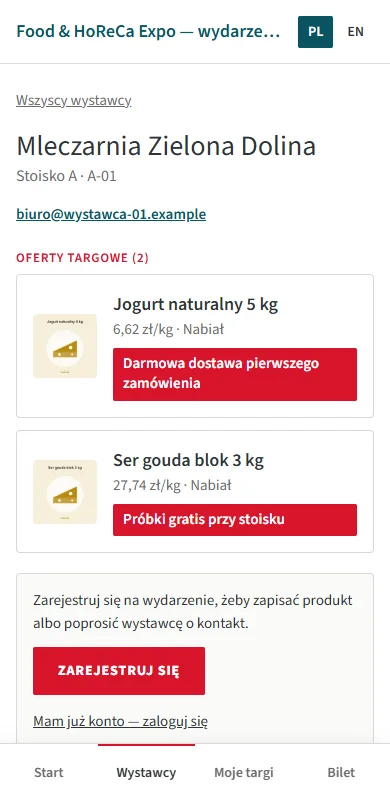
The QR code at the booth opens the exhibitor's contact details, fair offers and products.
- 3
Choosing products
The attendee opens and saves the products they are interested in. Each of these actions is a signal of interest.
- 4
Purchase intent score
When the attendee asks the exhibitor for contact, the platform turns their signals into a score from 0 to 100.
- 5
Leads by priority
The exhibitor knows who to call first. The organizer sees how many leads the fair produced.
We do not count scans. We measure purchase intent.
The same fair, two different results
Without Targometr
- The attendee visits a booth, takes a catalogue and leaves.
- Exhibitor: “I think there was a lot of interest.”
- Organizer: “A few hundred people visited us.”
With Targometr
- 503registered attendees
- 341entered the fair
- 9,153interactions with booths and products
- 493contact requests to exhibitors
- 132HOT leads
The numbers come from our demo event with 50 exhibitors. This is simulated data — it shows what the platform measures, not the result of a real fair.
This is what Targometr looks like
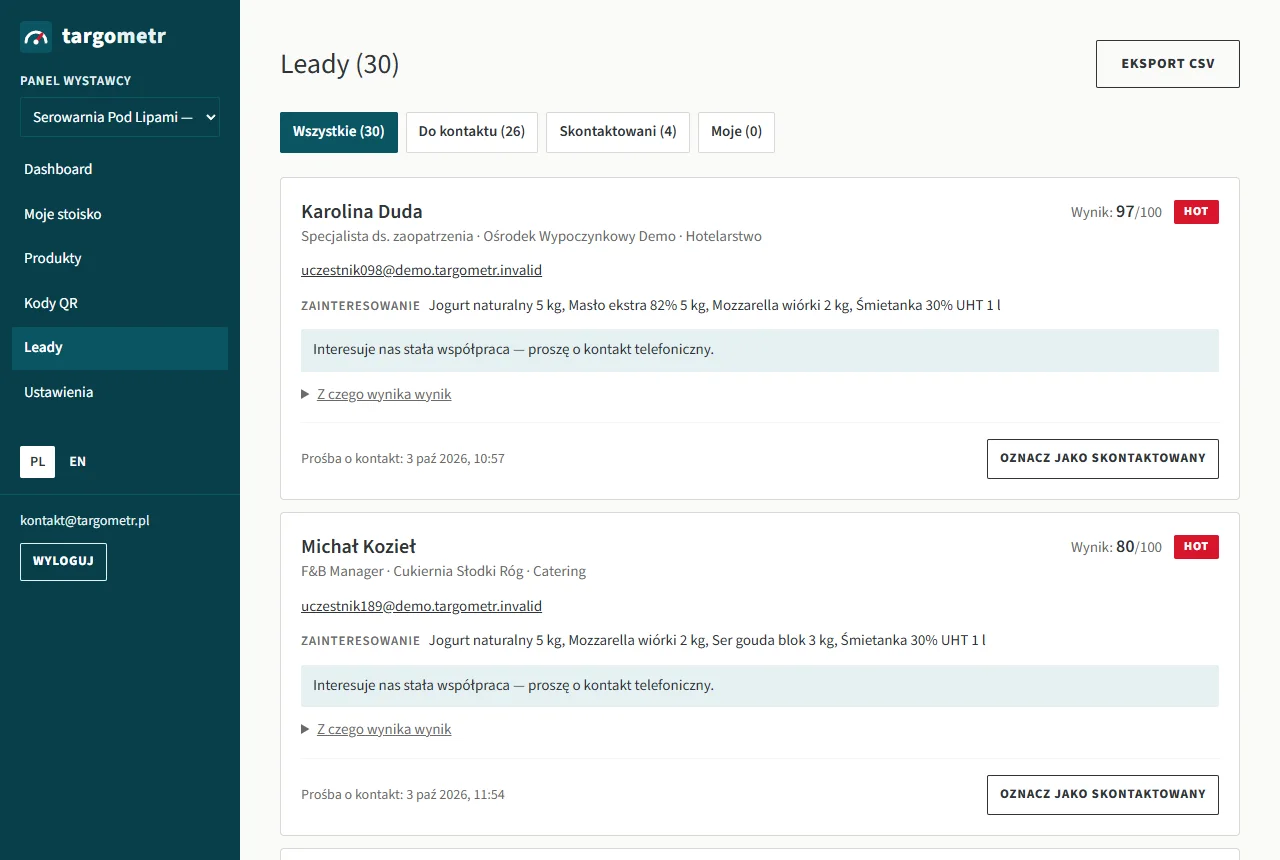
Screenshots from the demo event. Companies and people are fictional.

A fair you can measure
One panel runs the event from registration to the numbers you can show exhibitors before the next edition.
Registration and tickets
Your own event page with a registration form. The QR ticket is created instantly, with no badges to print.
Phone check-in
The scanner runs in the browser, on any number of phones at once, and copes with poor signal in the hall.
Exhibitors and booths
You add the company and booth number and invite its admin with a link. The exhibitor fills in the rest.
Offer approval
Every product and fair offer comes to you for approval before attendees see it.
Event analytics
Entries hour by hour, most visited booths, most popular products and categories.
Hall plan
Upload the floor plan and attendees have it on their phone next to the exhibitor list.
You know who to call first
Instead of a box of business cards you get a contact list showing what each person was interested in, and how much.
One QR code per booth
Print one code and put it on the counter. Add products with a form or from a CSV file; separate codes next to selected products are optional.
Fair offer
Products with a fair offer are shown to attendees first, with the promotion text visible right away.
HOT, WARM, COLD leads
Every contact has a score from 0 to 100 and a visible breakdown: what they scanned, saved and asked about.
Export and team
Download leads as CSV; salespeople get their own accounts and mark who they have already spoken to.
Not every contact is worth the same
The rules are the same for all exhibitors. The score describes the attendee's behaviour at a given booth. It is not a sales forecast — it is a hint about who to start with.
- Booth page openedweak signal
- Booth QR scanmoderate
- Product openedmoderate
- Scan of a code next to a selected product (optional)strong
- Product savedstrong
- Contact requeststrongest
- Stated purchase timelineextra signal
The score runs from 0 to 100 and sorts leads into HOT, WARM and COLD. The exhibitor sees what each lead's score is made of in their panel.
No app to download
QR code, browser, done.
- The attendee scans the code with the phone camera — nothing to install.
- Exhibitors and organizers work in a browser panel, on a computer or a phone.
- The ticket scanner runs on staff phones, also offline.
Attendee data under control
A fair organizer entrusts us with their guests' data. That is why privacy protection is built into how the platform works.
- An exhibitor sees an attendee's details only after the attendee asks them for contact — and only that one company receives them.
- The organizer sees aggregate statistics, with no names attached to scans.
- Every consent is stored with its date and wording; attendees withdraw it themselves in their account.
- The attendee's email address is confirmed before their details reach an exhibitor.
- The database runs in Ireland and the application servers in Frankfurt — in the European Union.
Frequently asked questions
Do attendees need to install an app?
No. Targometr runs in the phone browser. The regular camera is enough to scan QR codes.
What if there is no signal in the hall?
The ticket scanner downloads the list before opening and checks attendees in offline, sending check-ins once the network is back. Product pages opened from a QR code need a connection.
Who sees attendee data?
The organizer sees the list of registered people. An exhibitor sees details only of attendees who asked that exhibitor for contact. Other people's scans and views remain anonymous numbers.
How is the purchase intent score calculated?
The score grows with every attendee action at a given booth: opening the booth page counts least, a contact request and a near purchase timeline count most. The exhibitor sees the breakdown for every lead.
How do exhibitors add products?
With a form or by importing a CSV file — a template can be downloaded in the panel. The organizer approves every product before it is published.
How large can the event be?
The platform is designed for fairs from a few hundred to a few thousand attendees. We tested the scanner with a list of 3,000 tickets.
Which languages are supported?
Polish and English. Every user switches the language themselves.
How much does it cost?
We are running the first pilot deployments and agree terms individually. Write to us and we will prepare a proposal for your event.
Does Targometr support consumer (B2C) fairs?
Yes. The organizer chooses the type of fair for each event. At consumer fairs a visitor browses booths and fair prices without registering, and after giving a first name and e-mail can get coupons and subscribe to offers from chosen exhibitors. Targometr does not sell tickets — it works alongside your ticketing system.
Your next fair can deliver more than attendance
Tell us about your event. We will show the organizer panel, the exhibitor panel and the attendee journey, then prepare a deployment proposal.
Prefer email? kontakt@targometr.pl · +48 514 435 475